ATTENTION: Due to increased demand and order volume, processing time may take an additional 1-3 business days.
HomeCommunitySubjectATMEGA2560 Microcontroller: Pinout, Datasheet and Schematic

ATMEGA2560 Microcontroller: Pinout, Datasheet and Schematic

MICROCHIP - ATMEGA2560-16AU - MICROCONTROLLER MCU, 8 BIT, ATMEGA, 16MHZ, TQFP-100

6219

Jul 7, 2021

Vita Elinor

Arduino Mega 2560 Demo Overview


MICROCHIP - ATMEGA2560-16AU - MICROCONTROLLER MCU, 8 BIT, ATMEGA, 16MHZ, TQFP-100

ATMEGA2560 is an AVR RISC-based microcontroller that executes powerful instructions in a single clock cycle. This article mainly covers pinout, datasheet, features, schematic and other details.

ATMEGA2560-16AU

1100In Stock
Min.: 1 Mult.: 1
Quantity Unit Price Ext. Price
1+ $15.19669$15.2
10+ $14.3365$143.36
100+ $13.525$1352.5
500+ $12.75944$6379.72
1000+ $12.03721$12037.21
Unit Price:$15.19669
Subtotal: $15.2
Looking for a better price? Want a lower wholesale price? Please send an RFQ, and we will respond immediately.
Quick Links

ATMEGA2560 Description

ATMEGA2560 is commonly found in the Arduino Mega 2560 as its main microcontroller. It's an AVR RISC-based microcontroller that executes powerful instructions in a single clock cycle. This allows it to strike a fine balance between power consumption and processing speed.

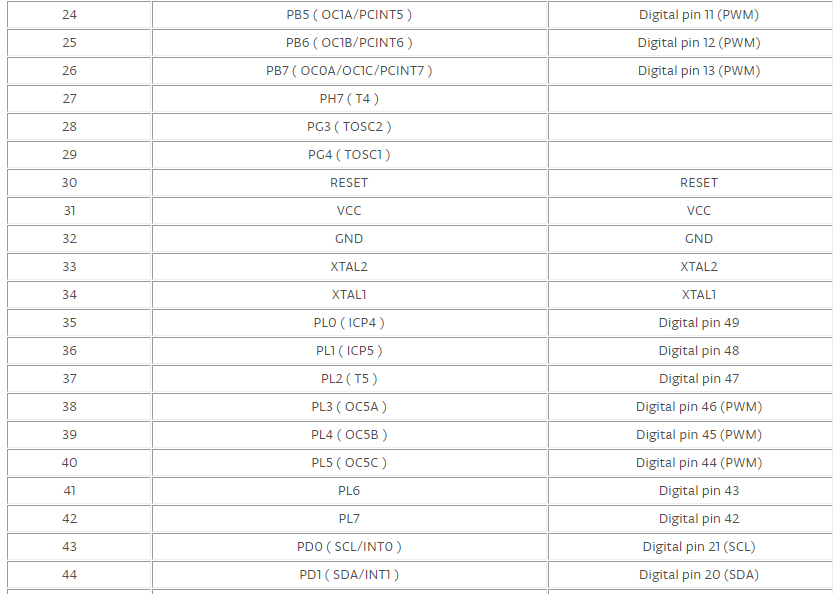
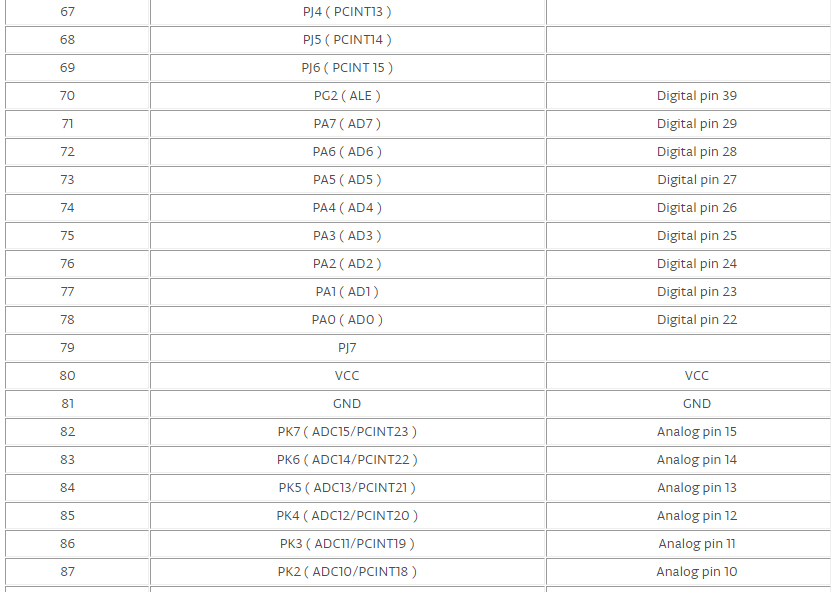
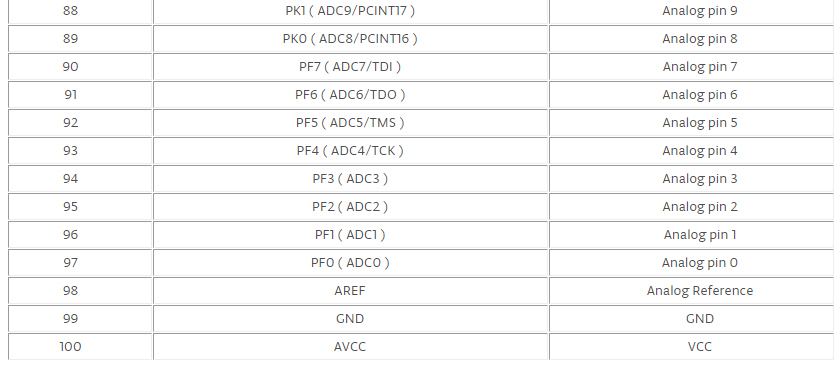
ATMEGA2560 Pinout

AtMEGA2560 CAD Model

Symbol


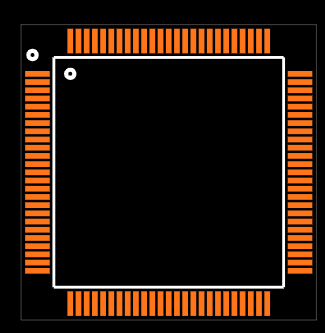
Footprint


3D Model

Specifications

Microchip Technology ATMEGA2560-16AU technical specifications, attributes, parameters and parts with similar specifications to Microchip Technology ATMEGA2560-16AU.

ATMEGA2560-16AU Tech Specifications

Microchip Technology ATMEGA2560-16AU technical specifications, attributes, parameters and parts with similar specifications to Microchip Technology ATMEGA2560-16AU.

Product Attribute Attribute Value
Factory Lead Time7 Weeks
MountSurface Mount
Mounting TypeSurface Mount
Package / Case100-TQFP
Number of Pins100Pins
Data ConvertersA/D 16x10b
Number of I/Os86I/Os
Watchdog TimersYes
Operating Temperature-40°C~85°C TA
PackagingTray
SeriesAVR® ATmega
Published2009
JESD-609 Codee3
Pbfree Codeyes
Part StatusActive
Moisture Sensitivity Level (MSL)3 (168 Hours)
Number of Terminations100Terminations
TerminationSMD/SMT
Terminal FinishMatte Tin (Sn) - annealed
Additional FeatureALSO OPERATES AT 2.7V MINIMUM SUPPLY AT 8 MHZ
Product Attribute Attribute Value
Terminal PositionQUAD
Terminal FormGULL WING
Peak Reflow Temperature (Cel)260
Supply Voltage5V
Terminal Pitch0.5mm
Frequency16MHz
Time@Peak Reflow Temperature-Max (s)40
Base Part NumberATMEGA2560
Operating Supply Voltage5V
Power Supplies5V
Interface2-Wire, EBI/EMI, I2C, SPI, UART, USART
Memory Size256kB
Oscillator TypeInternal
RAM Size8K x 8
Voltage - Supply (Vcc/Vdd)4.5V~5.5V
uPs/uCs/Peripheral ICs TypeMICROCONTROLLER, RISC
Core ProcessorAVR
PeripheralsBrown-out Detect/Reset, POR, PWM, WDT
Program Memory TypeFLASH
Core Size8-Bit
Product Attribute Attribute Value
Program Memory Size256KB 128K x 16
ConnectivityEBI/EMI, I2C, SPI, UART/USART
Bit Size8
Access Time16 μs
Has ADCYES
DMA ChannelsNO
Data Bus Width8b
Number of Timers/Counters6Timers/Counters
Density2 Mb
EEPROM Size4K x 8
Number of ADC Channels16ADC Channels
Number of PWM Channels12PWM Channels
Number of I2C Channels1I2C Channel
Height1.05mm
Length14.1mm
Width14.1mm
REACH SVHCNo SVHC
Radiation HardeningNo
RoHS StatusROHS3 Compliant
Lead FreeLead Free
0 Products View Similar

ATMEGA2560 Features

High Endurance Non-volatile Memory Segments:

  • Write/Erase Cycles: 10,000 Flash


Atmel QTouch library support

JTAG (IEEE std. 1149.1 compliant) interface

Peripheral Features:


  • Real-time Counter with Separate Oscillator

  • Programmable Watchdog Timer with Separate On-chip Oscillator

  • On-chip Analog Comparator

  • Interrupt and Wake-up on Pin Charge

Other special features:

  • Power-on Reset and Programmable Brown-out Detection

  • Internal Calibrated Oscillator

  • External and Internal Interrupt Sources

  • Six Sleep Modes: Idle, ADC Noise Reduction, Power-save, Power-down, Standby, and Extended Standby

ATMEGA2560 Applications

  • Developing 3D printer.

  • Controlling and handling more than one motors.

  • Interfacing of number of sensors.

  • Sensing and detecting temperature.

  • Water level detection projects.

  • Home automation and security systems.

  • Embedded Systems.

  • IoT applications.

ATMEGA2560 Alternative

ATMEGA128 series and ATMEGA88 series are replaceable.

ATMEGA2560 Schematic

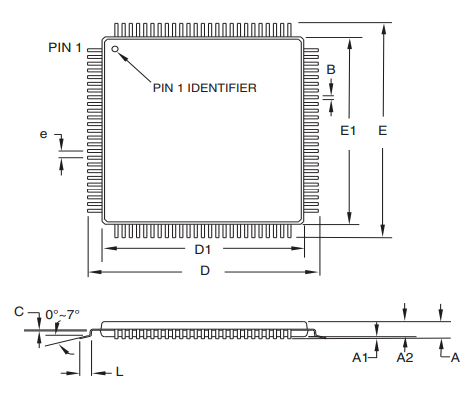
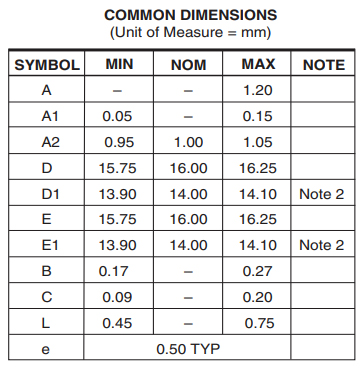
ATMEGA2560 Package

ATMEGA2560 Manufacturer

Microchip Technology Inc. is a leading provider of microcontroller and analog semiconductors, providing low-risk product development, lower total system cost and faster time to market for thousands of diverse customer applications worldwide. Headquartered in Chandler, Arizona, Microchip offers outstanding technical support along with dependable delivery and quality.

Datasheet PDF

Download datasheets and manufacturer documentation for Microchip Technology ATMEGA2560-16AU.

ATMEGA2560-16AU Documents

Download datasheets and manufacturer documentation for ATMEGA2560-16AU

Frequently Asked Questions

Does Arduino use the ATMEGA2560?
The MEGA 2560 is designed for more complex projects. With 54 digital I/O pins, 16 analog inputs and a larger space for your sketch it is the recommended board for 3D printers and robotics projects. This gives your projects plenty of room and opportunities.
Is there a DIP version of an ATMEGA2560?
No they don't make one.The largest 40 pin dip AVR mega chip is the mega1284. If has the same flash and eeprom memory size and actually has twice the SRAM (16k Vs 8k) as the 2560. However it of course has less I/O pins, less serial ports (2 Vs 4), and other resources are somewhat less, user interrupts, timers, etc.
How do I burn a bootloader to an Arduino ATMEGA2560?
This is quite a bit easier than updating the firmware on the ATmega16U2. Here's what I did.Stuff you will need: Your Arduino Mega. An USBtinyISP (mine says USBtinyISP v3.0). Various software that I will mention Step 1. Download the latest version of the Arduino IDE. Step 2. Download and install the USBtinyISP driver found HERE. Step 3. Download and install WinAVR, found HERE. Detailed instructions found HERE. Step 4. Open the Arduino IDE. Select your board and the USBtinyISP programmer (do not select a COM port).
What is the best ATMEGA2560 programmer?
Atmel-ICE is a powerful development tool for debugging and programming ARM® Cortex®-M based SAM and AVR microcontrollers with on-chip debug capability.
How can I get an Arduino Mega 2560 R3 to work in Windows 7?
First you will need to Download the SDK Go to their site and find it… (Make sure its for Windows 7). Next you will need to unzip it I put it in “My Documents” folder. Then after that do the following witch I have spent the last 30 mins making….. (So… Much time….).
FAQ
Does Arduino use the ATMEGA2560?
The MEGA 2560 is designed for more complex projects. With 54 digital I/O pins, 16 analog inputs and a larger space for your sketch it is the recommended board for 3D printers and robotics projects. This gives your projects plenty of room and opportunities.
Is there a DIP version of an ATMEGA2560?
No they don't make one.The largest 40 pin dip AVR mega chip is the mega1284. If has the same flash and eeprom memory size and actually has twice the SRAM (16k Vs 8k) as the 2560. However it of course has less I/O pins, less serial ports (2 Vs 4), and other resources are somewhat less, user interrupts, timers, etc.
How do I burn a bootloader to an Arduino ATMEGA2560?
This is quite a bit easier than updating the firmware on the ATmega16U2. Here's what I did.Stuff you will need: Your Arduino Mega. An USBtinyISP (mine says USBtinyISP v3.0). Various software that I will mention Step 1. Download the latest version of the Arduino IDE. Step 2. Download and install the USBtinyISP driver found HERE. Step 3. Download and install WinAVR, found HERE. Detailed instructions found HERE. Step 4. Open the Arduino IDE. Select your board and the USBtinyISP programmer (do not select a COM port).
What is the best ATMEGA2560 programmer?
Atmel-ICE is a powerful development tool for debugging and programming ARM® Cortex®-M based SAM and AVR microcontrollers with on-chip debug capability.
How can I get an Arduino Mega 2560 R3 to work in Windows 7?
First you will need to Download the SDK Go to their site and find it… (Make sure its for Windows 7). Next you will need to unzip it I put it in “My Documents” folder. Then after that do the following witch I have spent the last 30 mins making….. (So… Much time….).

TAGS

Share