ATTENTION: Due to increased demand and order volume, processing time may take an additional 1-3 business days.
HomeCommunitySubjectATTINY85 Microcontroller: Datasheet , Applications and Pinout

ATTINY85 Microcontroller: Datasheet , Applications and Pinout

IC MCU 8BIT 8KB FLASH 8SOIC ATTINY85 microcontroller is one of the small and high-performance AVR microcontrollers, which is based on RISC CPU.

389

Jun 29, 2021

Jason Maxwell

Arduino Tutorial – ATtiny85 explained in 4 minutes


IC MCU 8BIT 8KB FLASH 8SOIC

ATTINY85 microcontroller is one of the small and high-performance AVR microcontrollers, which is based on RISC CPU. This blog mainly convers its pinout, programming, datasheet and other information about ATTINY85.

ATTINY85-15SZ

5000In Stock
Min.: 1 Mult.: 1
Price not displayed? Not available to buy online? Please send an RFQ, and we will respond immediately.
Quick Links

ATTINY85 Description

ATTINY85 is a subfamily of the popular 8-bit AVR microcontrollers with fewer features, fewer I/O pins, and less memory than other AVR chips.It has 8 Kbytes of In-System Programmable Flash and is popular because of its compact size and its features.Through instructions executed in a clock cycle, a detail of ATTINY85 bits 1M per MHz enables system designers to optimize the relationship with processing speed.

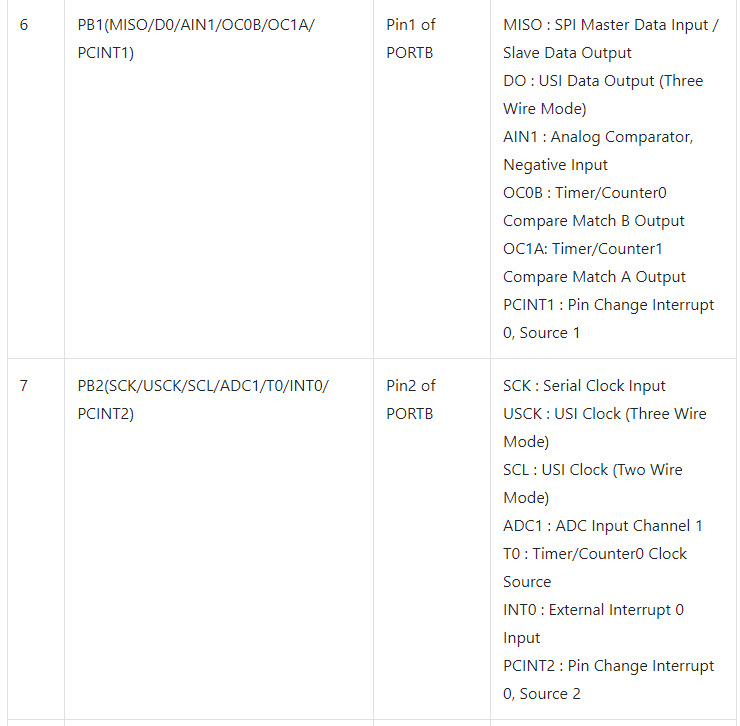
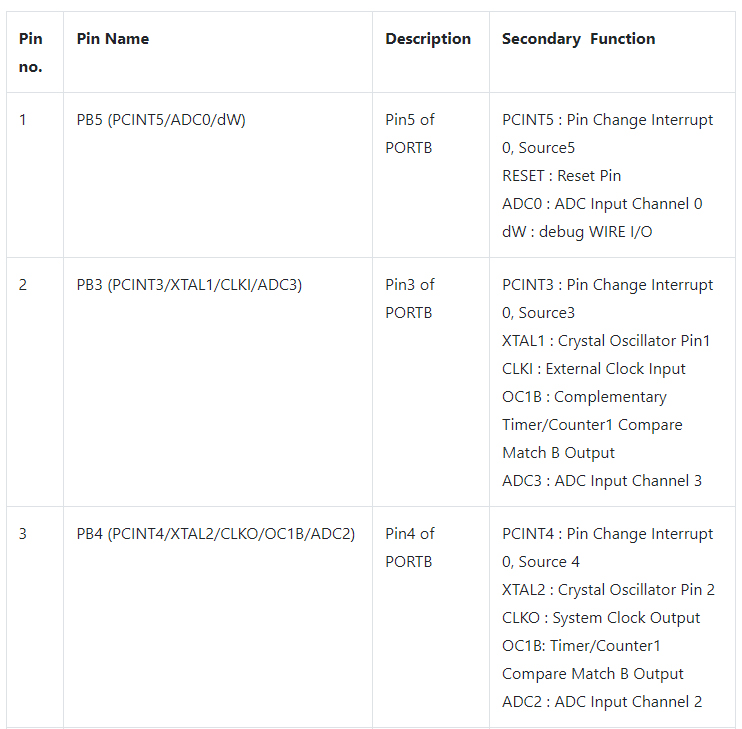
ATTINY85 Pinout

ATTINY85 CAD Model

Symbol


Footprint

Specifications

Microchip Technology ATTINY85-15SZ technical specifications, attributes, parameters and parts with similar specifications to Microchip Technology ATTINY85-15SZ.

ATTINY85-15SZ Tech Specifications

Microchip Technology ATTINY85-15SZ technical specifications, attributes, parameters and parts with similar specifications to Microchip Technology ATTINY85-15SZ.

Product Attribute Attribute Value
Factory Lead Time12 Weeks
Contact PlatingTin
MountSurface Mount
Mounting TypeSurface Mount
Package / Case8-SOIC (0.209, 5.30mm Width)
Number of Pins8Pins
Data ConvertersA/D 4x10b
Number of I/Os6I/Os
Watchdog TimersYes
Operating Temperature-40°C~125°C TA
PackagingTape & Reel (TR)
SeriesAutomotive, AEC-Q100, AVR® ATtiny
Published1997
Pbfree Codeyes
Part StatusActive
Moisture Sensitivity Level (MSL)1 (Unlimited)
Product Attribute Attribute Value
Number of Terminations8Terminations
Terminal PositionDUAL
Terminal FormGULL WING
Supply Voltage5V
Frequency16MHz
Base Part NumberATTINY85
Qualification StatusNot Qualified
Supply Voltage-Max (Vsup)5.5V
Power Supplies3/5V
Supply Voltage-Min (Vsup)4.5V
InterfaceSPI, UART
Memory Size8kB
Oscillator TypeInternal
RAM Size512 x 8
Voltage - Supply (Vcc/Vdd)2.7V~5.5V
uPs/uCs/Peripheral ICs TypeMICROCONTROLLER, RISC
Product Attribute Attribute Value
Core ProcessorAVR
PeripheralsBrown-out Detect/Reset, POR, PWM, WDT
Program Memory TypeFLASH
Core Size8-Bit
Program Memory Size8KB 4K x 16
ConnectivityUSI
Bit Size8
Has ADCYES
DMA ChannelsNO
Data Bus Width8b
PWM ChannelsYES
DAC ChannelsNO
Number of Timers/Counters2Timers/Counters
EEPROM Size512 x 8
RoHS StatusROHS3 Compliant
0 Products View Similar

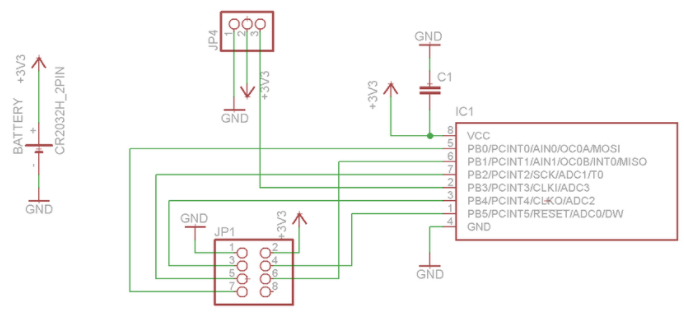
ATTINY85 PCB Schematic

ATTINY85 Alternatives

ATTINY25, ATTINY45, ATTINY25V, ATTINY45V, ATTINY85V

ATTINY85 Circuit

On the breadboard, build the circuit as shown in the diagram. The LED cathode (-) legs are on the left of the image, and they connect to a single ground pin on the ATtiny85 via a 330 Ohm resistor. The male to male jumper jerky connects the 330 Ohm resistors for two of the LEDs to the third, creating a single Ground connection that is connected to the ATtiny85. The anode (+) leg of the LED is connected directly to Pins 0,1,2 using the male to female jumper jerky.

How to use ATTINY85

1.Disconnect your ATtiny85 from your Uno, and hook it up to any power source, like some batteries.

2.Take the three 220 Ohm resistors, and connect each of them separately to pin 0,1 and 2.

3.Connect each LED anode to separate resistors.

4.Connect all LED cathodes to GND.

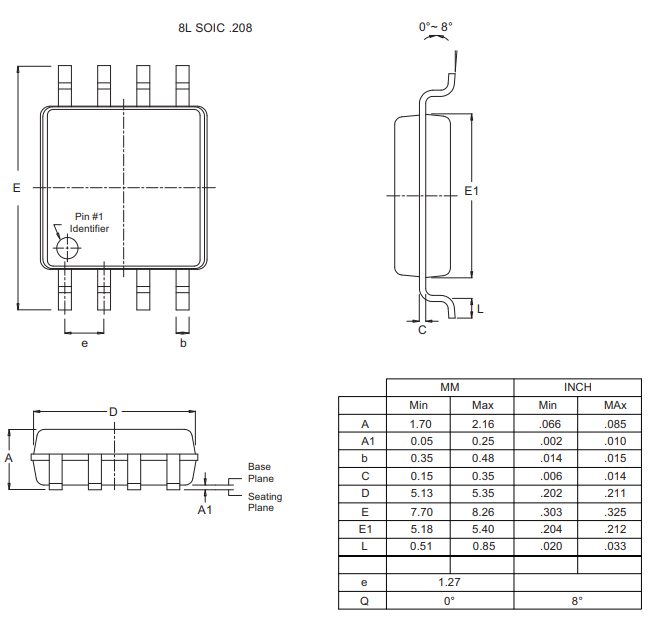
ATTINY85 Package

ATTINY85 Applications

  • ATtiny85 used in development boards and hobbies projects.

  • In the industrial control system, the PIC is used due to its multiple functionalities due to a specific operation on special conditions.

  • PIC is also used for analog manipulation and its measurement.

  • In small commercial devices, the PIC ATtiny85 is used.


ATTINY85 Manufacturer

Microchip Technology Inc. is a leading provider of microcontroller and analog semiconductors, providing low-risk product development, lower total system cost and faster time to market for thousands of diverse customer applications worldwide. Headquartered in Chandler, Arizona, Microchip offers outstanding technical support along with dependable delivery and quality.


Datasheet PDF

Download datasheets and manufacturer documentation for Microchip Technology ATTINY85-15SZ.

ATTINY85-15SZ Documents

Download datasheets and manufacturer documentation for ATTINY85-15SZ

Frequently Asked Questions

How do I program an ATTINY85 with Arduino?
First, pair with the Arduino IDE. Second, program the ATtiny85 with Arduino. Then, ATtiny85 LED Blinking. Last, Advanced Programming with ATtiny85.
Where can I see an ATTINY85 pinout diagram?
ATtiny85 Low Power AVR 8-Bit Microcomtroller Small package (8-pin) Flash 8K SRAM 512B EEPROM 512B I/O Pins 5 (or 6).
Where can I find an ATTINY85 programming tutorial?
Step by step on how to program a ATtiny85 microcontroller with Arduino Uno development board.
What language does attiny85 use for programming?
You can use assembly or C language. For compilation, you can use ATMEL AVR Studio C. If you are a beginner, you can use ICC AVR, for there are more online resources.
FAQ
How do I program an ATTINY85 with Arduino?
First, pair with the Arduino IDE. Second, program the ATtiny85 with Arduino. Then, ATtiny85 LED Blinking. Last, Advanced Programming with ATtiny85.
Where can I see an ATTINY85 pinout diagram?
ATtiny85 Low Power AVR 8-Bit Microcomtroller Small package (8-pin) Flash 8K SRAM 512B EEPROM 512B I/O Pins 5 (or 6).
Where can I find an ATTINY85 programming tutorial?
Step by step on how to program a ATtiny85 microcontroller with Arduino Uno development board.
What language does attiny85 use for programming?
You can use assembly or C language. For compilation, you can use ATMEL AVR Studio C. If you are a beginner, you can use ICC AVR, for there are more online resources.

TAGS

Share