ATTENTION: Due to increased demand and order volume, processing time may take an additional 1-3 business days.
HomeCommunitySubjectFLIRE5 Infrared Cameras: Datasheet, Price and Benefits

FLIRE5 Infrared Cameras: Datasheet, Price and Benefits

FLIR E5 IR CAMERA W/MSX AND WIFI FLIR E5 infrared cameras are powerful and extremely cost-effective, easy-to-use troubleshooting tools for building,

33

Jul 31, 2021

Tony Jack

Introducing the FLIR E5 Infrared Camera with MSX


FLIR E5 IR CAMERA W/MSX AND WIFI

FLIR E5 infrared cameras are powerful and extremely cost-effective, easy-to-use troubleshooting tools for building, electrical, and mechanical applications. This article enforces datasheet, price, FLIR E5 WIFI, and other details about FLIR E5.
FLIR E5

Inquiry
Min.: 1 Mult.: 1
Price not displayed? Not available to buy online? Please send an RFQ, and we will respond immediately.
Quick Links

FLIRE5 Description

The FLIR E5 cameras are point-and-shoot infrared cameras that give you access to the infrared world. A FLIR Ex series camera is an affordable replacement for an infrared thermometer, providing a thermal image with temperature information in every pixel. The new MSX and visual formats make the cameras incomparably easy to use.


FLIRE5 Benefits

  • Easy to use:

      The FLIR Ex series cameras are fully automatic and focus-free with an intuitive interface for simple thermal, visual, or MSX mode        measurements.

  • Compact and rugged:

      The FLIR Ex series cameras’ low weight of 0.575 kg and the accessory belt pouch make them easy to bring along at all times.            Their rugged design can withstand a 2 m drop test, and ensures reliability, even in harsh environments.

  • Groundbreaking affordability:

      The FLIR Ex series cameras are the most affordable infrared cameras on the market.

Specifications

FLIR FLIR E5 technical specifications, attributes, parameters and parts with similar specifications to FLIR FLIR E5.

FLIR E5 Tech Specifications

FLIR FLIR E5 technical specifications, attributes, parameters and parts with similar specifications to FLIR FLIR E5.

Product Attribute Attribute Value
Factory Lead Time6 Weeks
SeriesEX
Published2013
Product Attribute Attribute Value
Part StatusObsolete
Moisture Sensitivity Level (MSL)Not Applicable
TypeInfrared Camera, Thermal Imager
Product Attribute Attribute Value
IncludesBattery, Cable, Case, Charger, Manual, Power Supply
For MeasuringTemperature (Non-Contact)
0 Products View Similar

FLIRE5 Applications

FLIRE5 cameras are easy-to-use troubleshooting tools for building, electrical, and mechanical applications.

• Fully automatic and focus-free

• Simple button navigation to on-screen settings, imaging modes, and measurement tools

• MSX adds digital camera detail to IR images for better perspective and interpretation

How to use FLIRE5

  • Wi-Fi connectivity to mobile devices via FLIR Tools Mobile app

  • Rapid Wi-Fi or USB image transfer for documentation

  • Analyze and edit images, and create convincing reports with FLIR Tools

FLIR E5 Features

1. Fully automatic

The FLIRE5 can generate real-time "point-and-shoot" JPEG infrared images, which contain all temperature data.

2. Free focus

The focus-free fixed-focus lens makes the FLIR Ex series extremely easy to use.

3. Compact structure and lightweight

The FLIR Ex series weighs only 575 grams, which is convenient for waist bag storage.

4. Visible light camera

The visible light camera facilitates faster and more convenient observation.

5. Contains report and analysis software

FLIR Tools software can be downloaded and used by all Ex series users.


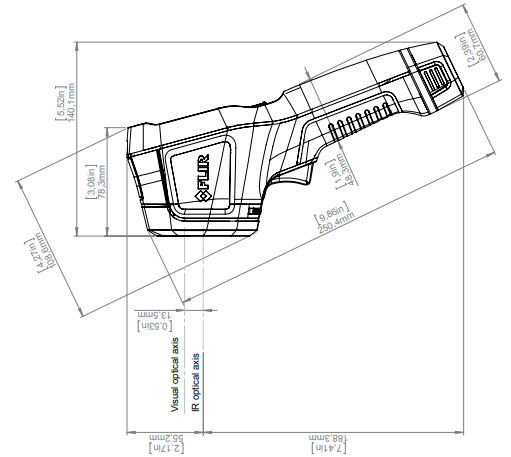
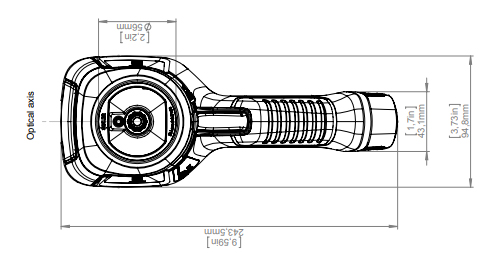
FLIRE5 Dimension

FLIRE5 Manufacturer

FLIR Systems, Inc. designs, develops, manufactures, markets, and distributes technologies that enhance perception and awareness. They bring innovative sensing solutions into daily life through their thermal imaging systems, visible-light imaging systems, locator systems, measurement and diagnostic systems, and advanced threat detection systems. Their products improve the way people interact with the world around them, enhance public safety and well-being, increase energy efficiency, and enable healthy and entertained communities.

Frequently Asked Questions

How do I connect my FLIR C5 to WIFI?
Connect your camera to a Wi-Fi network by accessing the Settings > Connections > Wi-Fi. Toggle the Wi-Fi Connectivity on. Select the network you desire to connect to and introduce the password if necessary. On your FLIR C5/C3-X camera go to Settings>Accounts and hit Pair.
Why is FLIR so expensive?
What makes these cameras so expensive? Because their camera sensor and processor are made of expensive material, a m lens is expensive than a fixed lens. The. They using very expensive kinds of glass lens elements.
How do I connect my FLIR camera to my computer?
1.Open Programs and Features in the Windows Control Panel. 2.Select FLIR Tools from the list. 3.Click the Change button. 4.Click the Options button and click "Network Camera Support". Then continue with the installation.
FAQ
How do I connect my FLIR C5 to WIFI?
Connect your camera to a Wi-Fi network by accessing the Settings > Connections > Wi-Fi. Toggle the Wi-Fi Connectivity on. Select the network you desire to connect to and introduce the password if necessary. On your FLIR C5/C3-X camera go to Settings>Accounts and hit Pair.
Why is FLIR so expensive?
What makes these cameras so expensive? Because their camera sensor and processor are made of expensive material, a m lens is expensive than a fixed lens. The. They using very expensive kinds of glass lens elements.
How do I connect my FLIR camera to my computer?
1.Open Programs and Features in the Windows Control Panel. 2.Select FLIR Tools from the list. 3.Click the Change button. 4.Click the Options button and click "Network Camera Support". Then continue with the installation.

TAGS

Share