ATTENTION: Due to increased demand and order volume, processing time may take an additional 1-3 business days.
HomeCommunitySubjectHow to Use CP2102 UART Module to Program Arduino Pro Mini?

How to Use CP2102 UART Module to Program Arduino Pro Mini?

Evaluation and Demonstration Boards and Kits CP2102N USB TO UART EVALUATION K CP2102 UART module is the upgraded version of RS-232 Communicator introduced by Silicon Labs.

1401

Nov 30, 2021

Kay Locke

cp2102driver install | cp2102 arduino | cp2102 driver esp8266


Evaluation and Demonstration Boards and Kits CP2102N USB TO UART EVALUATION K

CP2102 UART module is the upgraded version of RS-232 Communicator introduced by Silicon Labs. This article will talk about how to use CP2102 UART Module to Program Arduino Pro Mini. Welcome your RFQ

CP2102N-EK

98In Stock
Min.: 1 Mult.: 1
Quantity Unit Price Ext. Price
1+ $35.10503$35.11
10+ $33.11795$331.18
100+ $31.24335$3124.34
500+ $29.47486$14737.43
1000+ $27.80647$27806.47
Unit Price:$35.10503
Subtotal: $35.11
Looking for a better price? Want a lower wholesale price? Please send an RFQ, and we will respond immediately.
Quick Links

CP2102 Pinout

CP2102 Pinout


Pin Name

Function

VCCIO

Positive Power Supply pin

GND

Ground pin

RST

Reset pin

TXD

UART  Serial Transmission pin

RXD

UART Serial Reception pin

CTS

Active low Clear-to-Send input pin. It supports the Xon/Xoff handshake mechanism.

RTS

Active low Ready-to-Send output pin It supports the Xon/Xoff handshake mechanism.

DSR

Active low Data Set Ready input pin. It shows that it is ready to accept the data..

DTR

Active low Data Terminal Ready output pin. It shows that the terminal is ready for data transfer.

DCD

Active low Data Carrier Detect input pin.   It indicates when a good carrier is received from the modem.

SUSPEND

Active high USB suspend state pin

SUSPEND

Active low USB suspend state pin

RI

Active low Ring Indicator input pin. When it changes its state, a hardware interrupt is produced.

CP2102 Description

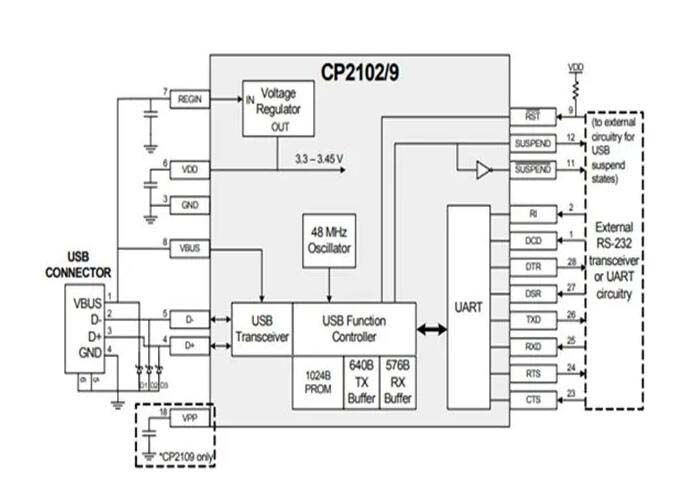
Silicon Labs introduced the CP2102 UART module, which is an updated version of the RS-232 Communicator. It's a USB to UART Bridge with a single CP2102 chip that runs at a full USB speed of 12Mbps. The CP2102 has an inbuilt high-performance serial data transmitter, as well as suspend/resume signals for chip energy control and external circuitry. The module enables handshaking and handles command requests from the USB host to control the asynchronous serial UART port's activity.

It also includes a 1024-byte PROM and a 48-MHz internal oscillator. Two voltage regulators and matching pull-up resistors are built within the device. The CP2102 is compatible with existing COM ports and Windows/Linux/Mac OS-X/OS-9. It does, however, necessitate the use of drivers to initiate serial connections.


CP2102 Feature

  • CP2102 UART module is integrated with a high-speed transceiver.

  • CP2102 has a 12Mbps full-speed USB Specification 2.0 compliant.

  • The module is embedded with two voltage regulator circuits i.e. 3.3V and 3.45V and a reset circuit.

  • For the power control, the module is integrated with Suspend pins.

  • It supports the  XOn/XOff handshake mechanism.

  • CP2102 is compatible with existing drivers and COM ports.

  • The module requires no external pull-up resistors.

CP2102 Application

  • Data Communication

  • Debug Purposes

  • Microcontroller programming

  • Prototypes

CP2102 Block Diagram

The following figure shows the block diagram of CP2102:

CP2102 Block Diagram

How to Use CP2102 UART Module to Program Arduino Pro Mini?

How does data transmission happen?

The USB port is used to connect the tiny chipset to the computer. The microcontroller unit's RX and TX signals are connected to the module's RX and TX signals. The modules connect to the host PC through a serial port. The information is sent from the host PC to the module, which converts it to  UART  signals that are sent to the microcontroller through the  UART protocol.

Interfacing Arduino Pro Mini

This USB to serial converter chip can be used to program  Arduino pro mini and other  Arduino modules that do not include an integrated USB programmer.

Install CP2102 UART Module Drivers

You must first install drivers before using this module. When you connect this USB module to a computer's USB port, the necessary drivers are automatically installed. However, if drivers aren't installed automatically, you'll have to do it manually. The first step is to install drivers in order to get things up and running. To install the drivers, follow the procedures below.

  • Software and Tools > CP210x Windows Drivers > Download and Install

  • Open Device Manager and check the COM port.

If it is detected, it is ready to be used. Open Arduino IDE > Tools > Board > Select Arduino Mini Pro. Then go to Tools > Serial Port > Select COM port.

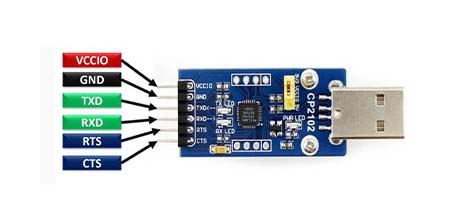
CP2102 Conecting Diagram

The CP2102 Connecting figure is shown below:

CP2102 Connecting Diagram


Arduino Pro Mini

CP2102 Module

VCC

VCCIO

GND

GND

RXI

TXD

TX0

RXD

DTR

DTR

Specifications

Silicon Labs CP2102N-EK technical specifications, attributes, parameters and parts with similar specifications to Silicon Labs CP2102N-EK.

CP2102N-EK Tech Specifications

Silicon Labs CP2102N-EK technical specifications, attributes, parameters and parts with similar specifications to Silicon Labs CP2102N-EK.

Product Attribute Attribute Value
Factory Lead Time2 Weeks
Published2016
Part StatusActive
Moisture Sensitivity Level (MSL)1 (Unlimited)
Product Attribute Attribute Value
TypeInterface
FunctionUSB 2.0 to UART (RS232) Bridge
Utilized IC / PartCP2102N
Supplied ContentsBoard(s)
Product Attribute Attribute Value
Evaluation KitYes
REACH SVHCNo SVHC
RoHS StatusNon-RoHS Compliant
0 Products View Similar

CP2102 Manufacturer

Silicon Labs (NASDAQ: SLAB) is a leading provider of silicon, software and system solutions for the Internet of Things, Internet infrastructure, industrial control, consumer and automotive markets. Resolving the electronics industry's toughest problems, providing customers with significant advantages in performance, energy savings, connectivity, and design simplicity. Backed by world-class engineering teams with unsurpassed software and mixed-signal design expertise, Silicon Labs empowers developers with the tools and technologies they need to advance quickly and easily from initial idea to final product.

Datasheet PDF

CP2102N-EK Documents

Download datasheets and manufacturer documentation for CP2102N-EK

Frequently Asked Questions

What is CP2102?
The CP2102 is a highly-integrated USB-to-UART Bridge Controller providing a simple solution for updating RS-232 designs to USB using a minimum of components and PCB space. ... An evaluation kit for the CP2102 (Part Number: CP2102EK) is available.
What is a USB to UART bridge?
Silicon Labs USB to UART Bridges are high-performance controller interface ICs that offer a complete plug and play interface solution. ... The USB-to-UART bridges consist of user-programmable custom baud rates of up to 2Mbps and support all modem interface signals.
How do I use Arduino as UART?
Arduino has one or more UART pins depending on the board. For our project, we will use an Arduino Uno which has only one UART interface found on pin 0 (RX0) and pin 1 (TX0). The Arduino pins 0 and 1 are also used for communicating with the Arduino IDE via the USB.
FAQ
What is CP2102?
The CP2102 is a highly-integrated USB-to-UART Bridge Controller providing a simple solution for updating RS-232 designs to USB using a minimum of components and PCB space. ... An evaluation kit for the CP2102 (Part Number: CP2102EK) is available.
What is a USB to UART bridge?
Silicon Labs USB to UART Bridges are high-performance controller interface ICs that offer a complete plug and play interface solution. ... The USB-to-UART bridges consist of user-programmable custom baud rates of up to 2Mbps and support all modem interface signals.
How do I use Arduino as UART?
Arduino has one or more UART pins depending on the board. For our project, we will use an Arduino Uno which has only one UART interface found on pin 0 (RX0) and pin 1 (TX0). The Arduino pins 0 and 1 are also used for communicating with the Arduino IDE via the USB.

TAGS

Share