ATTENTION: Due to increased demand and order volume, processing time may take an additional 1-3 business days.
HomeCommunitySubjectOV7670 Camera Module: Datasheet, Specifications and Comparison

OV7670 Camera Module: Datasheet, Specifications and Comparison

Unclassified The OV7670 camera module is a CMOS image sensor that provides full-frame windowed 8-bit images in a wide range of image formats.

741

Oct 10, 2021

Alma Black

OV7670 Camera Module with Arduino: Color Image To PC (Step-By-Step Guide)


Unclassified

The OV7670 camera module is a CMOS image sensor that provides full-frame windowed 8-bit images in a wide range of image formats. This article mainly covers datasheet, specifications, pinout, applications, and more details about the OV7670 camera module. Furthermore, there is a huge range of semiconductors, capacitors, resistors, and ICs in stock. Welcome your RFQ!

OV7670 Camera Board (B)

Inquiry
Min.: 1 Mult.: 1
Price not displayed? Not available to buy online? Please send an RFQ, and we will respond immediately.
Quick Links

What is OV7670 Camera Module?

The CMOS OV7670 camera module is one kind of CMOS image sensor available in low voltage, high sensitivity, and small size. This module provides the complete single-chip VGA camera functionality & an image processor within a tiny footprint package.

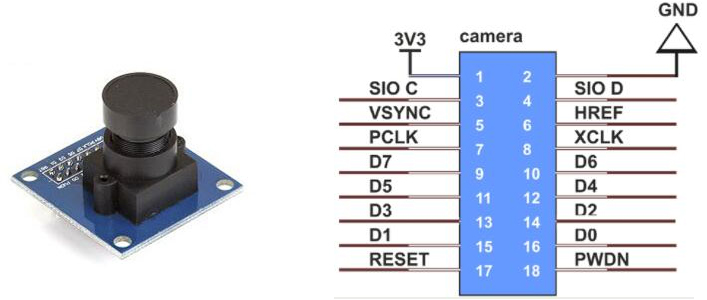
OV7670 Pinout


Pin   Number Pin Type Description
1 VCC '+3.3V DC power input
2 GND Ground
3 SCL I2C Serial Clock
4 SDA I2C Serial Data I/O
5 VSYNK Vertical Sync output;   Active High; Indicates active frames
6 HREF Horizontal Reference;   Active High; Indicates active pixels
7 PCLK Pixel clock output   from the sensor
8 XCLK Master clock into the   sensor
9 Dout9 Pixel Data Outuput   9(MSB)
10 Dout8 Pixel Data Output 8
11 Dout7 Pixel Data Output 7
12 Dout6 Pixel Data Output 6
13 Dout5 Pixel Data Output 5
14 Dout4 Pixel Data Output 4
15 Dout3 Pixel Data Output 3
16 Dout2 Pixel Data Outuput   2(LSB)

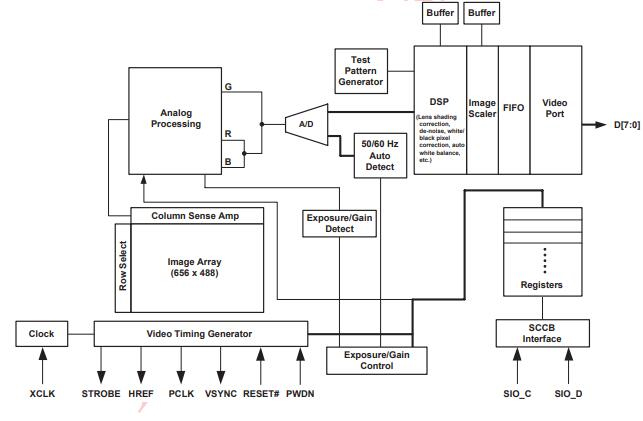
OV7670 Functional Block Diagram

The functional block diagram of the OV7670 camera module mainly includes A/D converters, timing generators, DSP, array of image sensors, test pattern generators, digital video port for image scalar, LEDs & strobe flash control o/p.

OV7670 Functional Block Diagram 

OV7670 Features

  • High sensitivity for low-light operation

  • Low operating voltage for embedded portable apps

  • Standard SCCB interface compatible with I2C interface

  • Output support for Raw RGB, RGB (GRB 4:2:2, RGB565/555/444), YUV (4:2:2) and YCbCr (4:2:2) formats

  • Supports image sizes: VGA, CIF, and any size scaling down from CIF to 40x30

  • VarioPixel® method for sub-sampling

  • Automatic image control functions including Automatic Exposure Control (AEC), Automatic Gain Control (AGC), Automatic White Balance (AWB), Automatic Band Filter (ABF), and Automatic Black-Level Calibration (ABLC)

  • Image quality controls include color saturation, hue, gamma, sharpness (edge enhancement), and anti-blooming

  • ISP includes noise reduction and defect correction

  • Supports LED and flash strobe mode

  • Supports scaling

  • Lens shading correction

  • Flicker (50/60 Hz) auto-detection

  • Saturation level auto adjust (UV adjust)

  • Edge enhancement level auto adjust

  • De-noise level auto adjust

OV7670 Specifications

  • Photosensitive Array: 640 x 480.

  • IO Voltage: 2.5V to 3.0V.

  • Operating Power: 60mW/15fpsVGAYUV.

  • Sleeping Mode: <20μA.

  • Operating Temperature: -30 to 70 deg C.

  • Output Format: YUV/YCbCr4:2:2 RGB565/555/444 GRB4:2:2 Raw RGB Data (8 digit).

  • Lens Size: 1/6″.

  • Vision Angle: 25 degrees.

  • Max. Frame Rate: 30fps VGA.

  • Sensitivity: 1.3V / (Lux-sec).

  • Signal to Noise Ratio: 46 dB.

  • dynamic range: 52 dB.

  • Browse Mode: By row.

  • Electronic Exposure: 1 to 510 row.

  • Pixel Coverage: 3.6μm x 3.6μm.

  • Duck Current: 12 mV/s at 60℃.

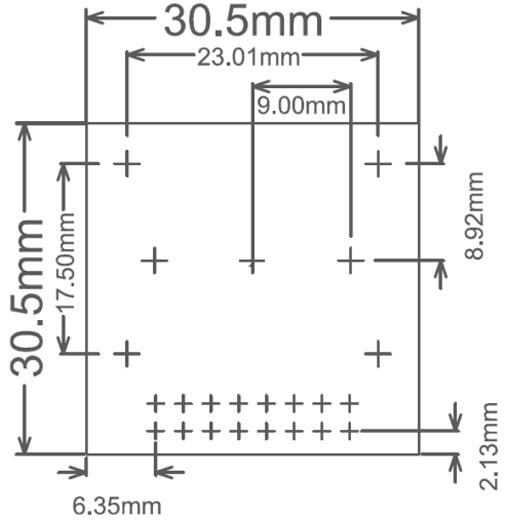
  • PCB Size (L x W): Approx. 1.4 x 1.4 inch / 3.5 x 3.5 cm.

OV7670 Camera Board (B) Tech Specifications

Waveshare OV7670 Camera Board (B) technical specifications, attributes, parameters and parts with similar specifications to Waveshare OV7670 Camera Board (B).

Product Attribute Attribute Value
PackagingBag-packed
Product Attribute Attribute Value
RoHS StatusRoHS Compliant
Product Attribute Attribute Value
0 Products View Similar

OV7670 Applications

  • Cellular phone

  • Facial Recognition

  • Document scanning

  • Surveillance systems

  • Obstacle avoidance

Equivalents for OV7670 Camera Module

OV7675, OV2640, OV7725, OV5642, OV5647


OV7670 vs. OV2640

Key   Specs OV2640 OV7670
Array Size 1600 x 1200 (UXGA) 640 x 480 (VGA)
Power Supply Core: 1.3V DC ± 5%   Analog: 2.5~3.0V DC I/O: 1.7V to 3.3V Core: 1.8V DC ± 10%   Analog: 2.45~3.0V DC I/O: 1.7V to 3.0V
Power   Consumption Free running: 125mW   Standby:600μA Free running: 60mW   Standby: < 20μA
Image Sensor   Format Type 1/4″ Type 1/6″
Maximum Image   Transfer Rate 1600× 1200@15fps,   SVGA@30fps, CIF@60fps VGA@30fps
Sensitivity 0.6V/Lux-sec 1.3V/Lux-sec
S/N ratio 40dB 46dB
Dynamic Range 50dB 52dB
Pixel Size 2.2 x 2.2 μm 3.6 x 3.6 μm
Output Format YUV/RGB/Raw RGB   Data/MJPEG YUV/RGB/GRB/Raw RGB   Data
Shutter Type Rolling Shutter Rolling Shutter

OV7670 Camera Module Circuit

The following diagram shows how to connect a CMOS OV7670 camera module to an Arduino Uno. This module primarily contains serial data and a CLK pin, indicating that the Arduino UNO board can communicate with the camera module through I2C. Furthermore, it operates at 3.3 V, so if we want to use the Arduino board to send data to the CMOS camera module, we'll need to use a voltage divider to lower the voltage.
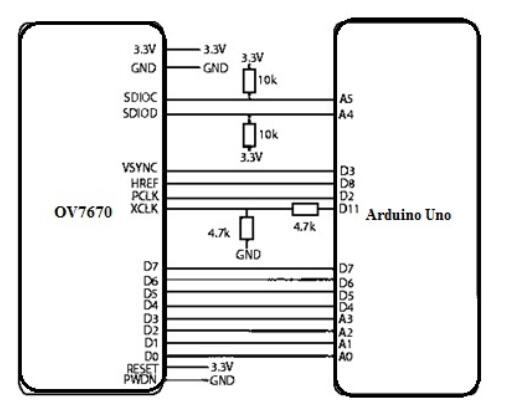
OV7670 Camera Module Circuit


It's important to note that the microcontroller has no effective method for displaying the collected image. It simply instructs the module to take a picture, acquire the image, and then transmit the image to a computer using the Arduino's USB port. As a result, you'll need a different application to display the image from the USB port on your computer. The required code is used to take a picture with the OV7670 camera module and Arduino in this example.

After that, we'll need a desktop application that will analyze the data from the Arduino's USB connection and display it on the monitor.

OV7670 Dimensions

OV7670 Manufacturer

OmniVision is a leading-edge imaging solution. Form the core of systems that produce high quality still and video images from smartphones, surveillance cameras, endoscopes, webcams, automotive cameras, and more.

Frequently Asked Questions

What is OV7670?
The OV7670 Camera Module is a small image sensor, with low operating voltage, providing all functions of a single chip of VGA camera and image processor.
What is the use of OV7670?
This module allows you to capture images in VGA format (640x480). It can perform some initial processing and transfer the images to microcontrollers, such as the Arduino, via the SCCB interface. The camera unit allows you to form images in other formats like CIF (352x240) and others.
How does OV7670 work?
The OV7670 image sensor is controlled using Serial Camera Control Bus (SCCB) which is an I2C interface (SIOC, SIOD) with a maximum clock frequency of 400KHz. The Camera comes with handshaking signals such as VSYNC: Vertical Sync Output – Low during the frame. HREF: Horizontal Reference – High during active pixels of row.
FAQ
What is OV7670?
The OV7670 Camera Module is a small image sensor, with low operating voltage, providing all functions of a single chip of VGA camera and image processor.
What is the use of OV7670?
This module allows you to capture images in VGA format (640x480). It can perform some initial processing and transfer the images to microcontrollers, such as the Arduino, via the SCCB interface. The camera unit allows you to form images in other formats like CIF (352x240) and others.
How does OV7670 work?
The OV7670 image sensor is controlled using Serial Camera Control Bus (SCCB) which is an I2C interface (SIOC, SIOD) with a maximum clock frequency of 400KHz. The Camera comes with handshaking signals such as VSYNC: Vertical Sync Output – Low during the frame. HREF: Horizontal Reference – High during active pixels of row.

TAGS

Share